Procedural props
Not every prop needs a model file. A crate, a jar, a lantern, a tent, a stone, a
cannon carriage: a handful of primitives in a few tones read as the real thing
at game scale, ship as code, repaint for free and cost one draw call per finish.
declarative-hex-worlds/sculpt is the modelling kit for that. It generalises the
"toy chest" a fleet game built to make every prop in its world procedurally, and
it is the home for procedural pieces grafted onto tiles.
import {
  box,
  buildPiece,
  createSculptMaterials,
  cyl,
  lathe,
  part,
  rock,
  rope,
  sheet,
} from 'declarative-hex-worlds/sculpt';
It needs three (an optional peer, >=0.184), like /three; the root entrypoint
never re-exports it. The kit has no koota, React or DOM dependency.
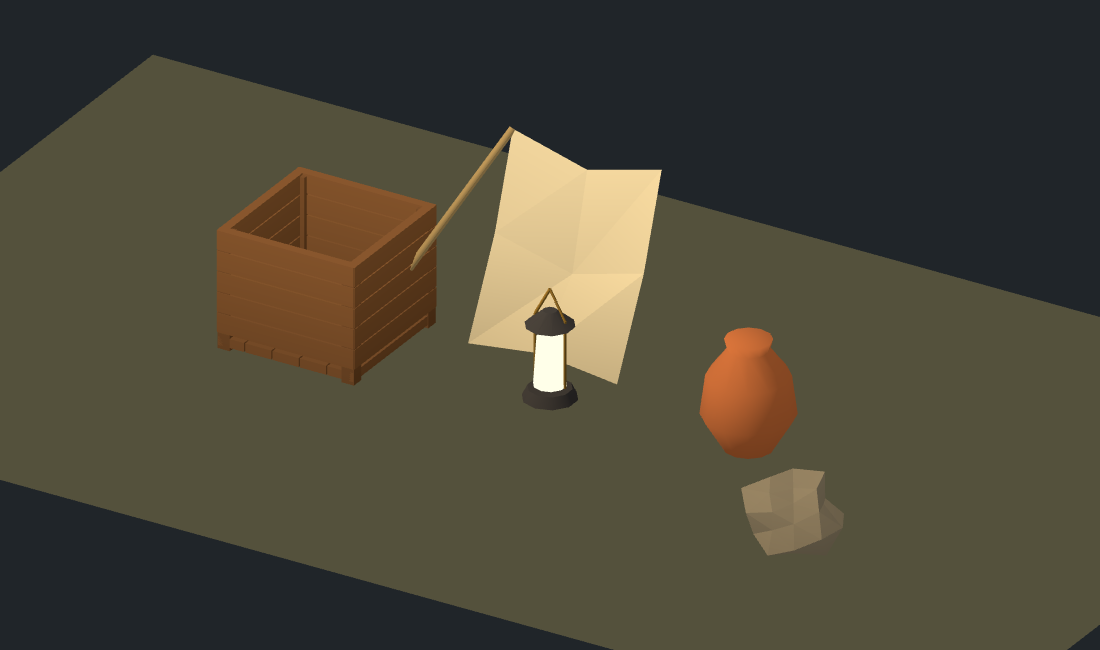
The isolated browser fixture builds this scene from the public sculpting
helpers, verifies varied rendered pixels, and limits it to eight draw calls
including the floor. Run test:browser:sculpt for the fixture and
test:screenshots:sculpt to validate its capture. Run the browser fixture from
the workspace root:
pnpm exec vitest run --config packages/declarative-hex-worlds/vitest.browser.free.config.ts tests/browser/sculpt-visual.test.tsFrame and units
Metres. A piece stands on y = 0, its front toward +z, its length along
x. Rotations are Euler XYZ in radians. A part's transform applies scale,
then rotation, then position. Model every piece in its own frame at its
reference size; the game places and scales the finished piece.
Parts
A part is a geometry placed in the piece's frame, painted one tone and one finish. Parts hold a tone key, not a colour, so a recipe never knows which game it is painted for.
// A lantern: iron cap and foot, a glowing glass chimney, a brass bail.
const lantern = [
  cyl(0.05, 0.06, 0.03, { at: [0, 0.015, 0], tone: 'iron' }),
  cyl(0.04, 0.045, 0.16, { at: [0, 0.11, 0], tone: 'lamp', finish: 'glow' }),
  cyl(0.02, 0.055, 0.04, { at: [0, 0.21, 0], tone: 'iron' }),
  box(0.01, 0.01, 0.1, { at: [0, 0.25, 0], tone: 'brass', finish: 'metal' }),
];| Part | Shape |
|---|---|
box(w, h, d, o) | A box, centred on its origin |
cyl(rTop, rBottom, h, o, seg?) | A cylinder along y; a radius of 0 makes a cone |
cone(r, h, o, seg?) | A cone along y |
ball(r, o, seg?) | A sphere |
ring(r, tube, o, seg?) | A torus in the xy plane (hoops, handles) |
plane(w, h, o) / disc(r, o, seg?) | A flat rectangle / disc in the xy plane, facing +z |
lathe(profile, o, seg?) | A turned vessel from [radius, height] points, bottom to top |
rock(r, seed, o, rough?) | A rough faceted stone, deterministic by seed |
sheet(rows, flip?) → part(...) | Cloth from a grid of points |
rope(a, b, o) | A thin cylinder from point a to point b |
part(geometry, o) | Any BufferGeometry as a part |
o is { at, rot, scale, tone, finish?, shade? }. shade multiplies the tone
(below 1 is darker: a crack, a shadowed underside).
// A jar turned on a lathe, a rock beside it, a canvas sheet, a guy-rope.
const jar = lathe(
  [[0, 0], [0.09, 0.01], [0.14, 0.08], [0.16, 0.2], [0.08, 0.38], [0.09, 0.42], [0, 0.42]],
  { tone: 'clay' },
);
const stone = rock(0.18, 7, { at: [0.5, 0.1, 0], tone: 'stone' });

// A sloped flap: rows step down and toward +z, columns step +x, so it faces up and front.
const flap = part(
  sheet([
    [[0, 0.6, 0], [0.5, 0.6, 0]],
    [[0, 0, 0.4], [0.5, 0, 0.4]],
  ]),
  { tone: 'canvas' },
);
const guy = rope([0, 2, 0], [1.5, 0, 1], { tone: 'rope' });
Sheets and their winding
sheet(rows, flip = false) makes two triangles per cell of a grid of points
([x, y, z] tuples or Vector3s). The front face looks along
(row step) x (column step): a ground sheet whose rows step +z and columns
step +x faces up (z x x = +y); a wall whose rows step +x and columns step
+y faces +z. Pass flip to reverse it, which is how a tent's two roof
panels face outward from opposite sides.
Rocks are deterministic
rock roughens an icosahedron with a hash of each vertex position and the
integer seed. The same (r, seed, rough) gives byte-identical vertices in
every process, shared corners move together (no cracks), and nothing calls
Math.random. Each vertex lands between r * (1 - rough) and r * (1 + rough)
from the centre (the stone is also squashed to 80 % height so it sits low).
Building a piece
buildPiece(parts, palette, options?) merges parts into one geometry per
finish, vertex-coloured. The palette is yours: a map from tone key to any
colour three.js accepts.
const palette = {
  oak: '#7a5230', iron: '#3a3a40', brass: '#c9a24b',
  lamp: '#ffd28a', clay: '#b8693d', stone: '#8d8678',
  canvas: '#d8cfb4', rope: '#a08a60',
} as const;

const pieces = buildPiece([...lantern, jar, stone, flap, guy], palette, { grounded: true });
// Map<finish, BufferGeometry>: 'matte', 'metal' and 'glow' here.
Each vertex is palette[tone] * shade * finish.gain. The tone type is inferred
from the palette, so a typo in a part's tone is a compile error, and a missing
tone is a GameboardValidationError at run time.
The parts are consumed: their geometries are disposed after the merge, so build each piece from fresh parts. Everything is validated before any part is consumed.
Finishes
A finish is a baked-colour recipe plus the material you draw it with.
| Finish | For | gain | Contact shadow |
|---|---|---|---|
matte | stone, wood, clay, cloth | 1 | yes |
metal | gold, bronze | 1 | yes |
glow | lamp glass, embers | 3.2 | no |
veil | cobweb, dust | 1 | yes |
A gain above 1 over-drives the baked colour past display white, so an unlit,
un-tone-mapped material blooms. Retune a built-in or add your own through
options.finishes:
buildPiece(parts, palette, {
  finishes: {
    foil: { gain: 1.4, shadowed: false }, // a new finish
    glow: { gain: 5, shadowed: false },   // brighter than the default
  },
});
Draw each geometry with a vertexColors material. createSculptMaterials()
returns one for each built-in finish (rough matte, glossy metal, an unlit
un-tone-mapped glow, a faint single-pass two-sided veil); a custom finish brings
its own material.
import { Group, Mesh } from 'three';

const materials = createSculptMaterials();
const group = new Group();
for (const [finish, geometry] of pieces) {
  group.add(new Mesh(geometry, materials[finish as keyof typeof materials]));
}
Because one material per finish paints every kind of piece, an InstancedMesh
per finish draws every copy of a piece in a scene.
The baked contact shadow
grounded: true darkens vertices toward the floor: a factor of 0.62 at
y = 0 rising to 1 at 0.5 m (contactFloor and contactHeight tune it).
A crate or a jar then sits on the ground instead of floating over it. Pieces
that do not stand on the ground, a hanging lantern for one, leave it off. It is
off by default, so colours equal tone * shade unless you ask.
Supplying a game's palette
The kit ships no colours. A game defines its tone table once and passes it to
every buildPiece:
// game/look/tones.ts
export const TONES = { /* oak, iron, brass, ... */ } as const;
export type Tone = keyof typeof TONES;

// game/props/crate.ts
export const crate = () => [box(0.6, 0.4, 0.4, { at: [0, 0.2, 0], tone: 'oak' }) /* ... */];
export const buildCrate = () => buildPiece(crate(), TONES, { grounded: true });
A different game reuses the same recipes with a different table, or none of the recipes at all.
Errors
Every rejection is a GameboardValidationError (from
declarative-hex-worlds/errors) whose message starts with sculpt: and names
the argument: a size that is negative or not finite, a segment count below three
or not an integer, a lathe profile with fewer than two points, a sheet that is
ragged or has a non-finite point, coincident rope endpoints, a non-integer rock
seed, an unknown tone or finish, an out-of-range contact option. A rejected call
leaves its inputs untouched.
See also
- Continuous terrain: the ground these pieces stand on.
- Pieces and actors: declaring a piece for placement on tiles.
- Determinism and replay: why nothing here is random.