The Chrome extension
The commands in Usage drive a browser this tool launches itself. That works, but it means a second sign-in in a profile Humble and Steam both treat as a new device — which is where Humble Guard prompts and Steam Guard checks come from.
The extension avoids that entirely. It runs in the Chrome you already use, so every request carries the session you already established, and there is no second login and no debug port left open.
What it does, and what it does not
The extension fetches and posts. It reads your orders from Humble, reads your owned applications from Steam, and submits the keys it is told to submit.
Every decision stays in hskr: which games you already own, which keys are
worth an activation, when a rate limit means stop. There is one implementation
of that logic rather than a JavaScript copy to keep in sync with it.
Install it
hskr bridge
That prints the steps: turn on Developer mode at chrome://extensions, load
the extension/ directory unpacked, and copy the ID Chrome assigns it. Then:
hskr bridge --extension-id <ID>
This registers the native messaging host. Chrome will only start a native host that names the calling extension, so the ID has to be registered before the extension can reach this tool at all.
Reload the extension afterwards.
Note
Chrome derives an unpacked extension’s ID from the directory it was loaded
from, so the ID survives reloads but changes if you move or re-clone the
repository. When that happens the host no longer names the extension Chrome
is running, and hskr browser reports that the browser did not respond. Copy
the new ID and run hskr bridge --extension-id <ID> again.
Drive it from the command line
hskr browser status     # signed in to Humble and Steam?
hskr browser sync       # import the library
hskr browser preview    # what would be redeemed, redeeming nothing
hskr browser redeem     # redeem what preview showed
Nobody has to open the popup or click anything, so an agent or a script can run
these. --reveal applies to redeem and behaves as it does elsewhere:
revealing a Humble key forfeits its gift link permanently, so it never happens
implicitly.
Chrome has to be running with the extension enabled. If it is not, the command says so rather than hanging.
Or click it
The extension’s toolbar button opens a popup with the same actions. It is the same work with a person driving it, and it reports the same summaries.
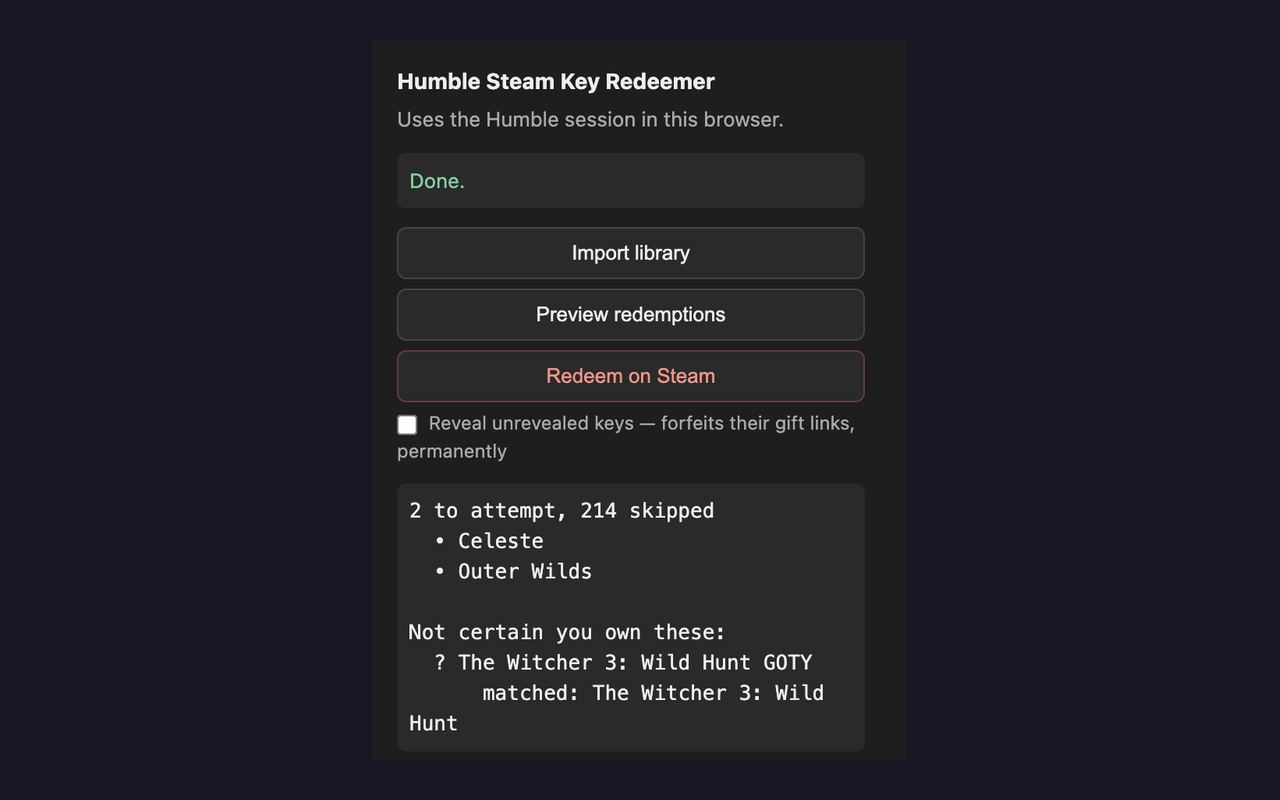
Redeeming arms on the first click and runs on the second, because it cannot be undone.
The same protections as the command line
This path is not the lenient one. It applies exactly what hskr redeem
does, because both ask the same code:
Games you already own are skipped, so an activation is not spent on a duplicate — which Steam counts as one of the ten failures it allows an hour.
Gift links and placeholder text never reach Steam. They live in the same field as real keys, and sending one spends a failure for nothing.
A key is marked in flight before Steam sees it. If Chrome closes or the service worker is terminated mid-activation, the key is left
attemptedrather than pending, so a later run does not offer it up a second time — Steam may well have accepted it.hskr statuslists these.A rate limit ends the run instead of deepening the cooldown, and keys that were only rate-limited stay eligible for the next one.
A failure that never reached Steam is not a verdict. A missing session, a request that did not complete, a reveal Humble refused — none of those settle a key, and none are counted as activations spent.
Nothing is revealed unless you ask. Revealing forfeits a key’s gift link permanently, so
--revealis required and applies only to keys about to be redeemed.
How a command reaches the browser
Chrome starts a native host itself and owns both ends of its pipes, so a
terminal running hskr browser has no way to write down that pipe.
So the instruction goes into a request file in the state directory. The host
Chrome already started picks it up, sends it to the extension over the one
stdio channel Chrome gives a native host, and the reply comes back the same
way. Files rather than a socket, because a socket would mean a listening port
and a second thing to secure; the state directory is already 0700, and each
request exists for the length of a single command.
The extension’s own questions travel down that same port. Traffic runs both directions over it, because it is the only channel that reaches the extension.
Permissions
Permission |
Why |
|---|---|
|
Talk to |
|
Run the fetches inside the Humble and Steam pages, so they carry your session. |
|
Find the Humble and Steam tabs, or open them. |
|
Reconnect after Chrome terminates the service worker. |
|
Limited to |
Nothing is sent anywhere but Humble, Steam, and the copy of hskr on your own
machine.